

DataKL Hosting
  • 0 Shopping Cart
DataKL Hosting
  • Home
  • Store
    • Browse All
    • Shared Linux Hosting
    • Litespeed Wordpress Hosting
    • Premium Shared Linux Hosting
    • Semi Dedicated Hosting
    • Addons
    • Register a New Domain
    • Transfer Domains to Us
  • Announcements
  • Knowledgebase
  • Network Status
  • Affiliates
  • Contact Us
  • Main Site
  • More
0 Shopping Cart Login Register
  1. Portal Home
  2. Knowledgebase
  3. Wordpress Basic
  4. How to remove a category in WordPress?

  Categories

Addon Domain
2
Backup/Restore
4
Basic Info
26
Basic Security
10
Billing and Payment
5
Blogspot
2
Connectivity Issue
3
cPanel - Control Panel
24
Databases
11
DNS
4
DNS - Nameserver
6
Domain Management
10
Domain Name
2
Email
14
Email
11
FTP
9
Mac & Apple
3
Mail Filters & SPAM
7
Mobile Email
11
MySQL & MariaDB
6
Others
3
Parked Domain
2
Paths
4
Php
7
Programming
4
Redirection
2
Script Installer
2
Softaculous Installer
79
SSL - Let's Encrypt
2
WHM
18
Wordpress Basic
17
Wordpress Issues
5

  Categories

  Tag Cloud

add on basic blogspot cpanel database deny disable functions DNS domain life cycle domain name email encoding hotlink MX nameservers permission php port redemption period redirect renewal hold Resolver smtp ssh SSL TOS webdisk webmail Wordpress

  Support

My Support Tickets
Announcements
Knowledgebase
Downloads
Network Status
Open Ticket

How to remove a category in WordPress? Print

  • 0

If you want to remove WordPress category then follow this instruction:


1. Login to your WordPress admin dashboard.
2. Under the dashboard menu, hover your mouse on Posts and then click on "Categories".
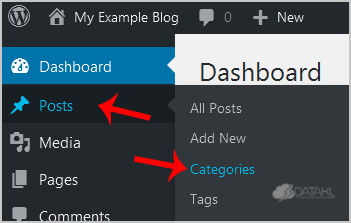
wp-dashboard-category-option.gif


3. On the right side you can see a list of categories. Hover your mouse on a category you wish to remove and a few options will appear. Click on the "Delete" option. The confirmation option will appear. Click on "OK".
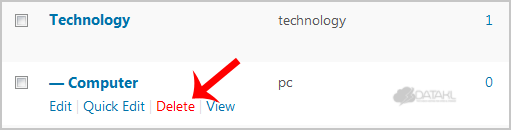
wp-remove-category-2.gif

Was this answer helpful?

Related Articles

How to remove multiple posts with a single click in WordPress? It is possible to remove multiple post in your WordPress dashboard. You can also remove selected... How to remove your post in Wordpress? You can remove your published or draft post in Wordpress.1. Login to your WordPress admin... How to add a new category in WordPress? 1. Login to your WordPress admin dashboard.2. Under the dashboard menu, hover your mouse on Posts... How to remove the Uncategorized category from WordPress? You can not remove "Uncategorized" Category but you can rename it1. Login to your WordPress admin... How to start writing your first blog post in WordPress? 1. Login to your WordPress admin dashboard.2. Under the dashboard menu, hover your mouse on Posts...
« Back

  Tag Cloud

add on basic blogspot cpanel database deny disable functions DNS domain life cycle domain name email encoding hotlink MX nameservers permission php port redemption period redirect renewal hold Resolver smtp ssh SSL TOS webdisk webmail Wordpress

  Support

My Support Tickets
Announcements
Knowledgebase
Downloads
Network Status
Open Ticket
  • Contact Us
  • Terms of Service

Copyright © 2025 DataKL Hosting. All Rights Reserved.


Loading...
Loading...

Generate Password

Please enter a number between 8 and 64 for the password length